

 Written by Siddharth Sharma,
Mar 4, 2026
Written by Siddharth Sharma,
Mar 4, 2026
As more organisations explore how AI can actually work inside Salesforce, Agentforce is quickly becoming a favourite. Unlike generic AI chatbots, Agentforce uses an organisation’s own internal knowledge base, including files, CRM data, case records, and process logic, to deliver answers that are accurate, contextual, and trusted. This allows you to build conversational experiences that feel natural to users while drawing on the full depth of your operational knowledge.
For this article, I wanted to go beyond the theory.
During a recent build for one of our customers, I explored how Agentforce could help users retrieve relevant information from both public and private data sources. The aim was to let a user ask a natural question and receive an accurate and secure response every time. What followed gave me a clear view of how Agentforce behaves in a real environment, the technical design choices that really matter, and the challenges teams should consider before building their own solution.
Curating the use case
For this project, the use case centered around information retrieval. Users would ask questions to an Agent that searched through a library of public documents (PDFs and HTML files) stored in Salesforce.
- If the requested information was public, the public Agent would respond directly.
- If the information was private, the Agent checked whether the user was logged in.
- Logged-in users could access private content via the Private Agent, while non-logged-in users were prompted to authenticate.
Design considerations that shaped the proof of concept
Keeping public and private information separate
In the early design stages of the proof of concept (PoC), I learned that effective orchestration between public and private Agents is essential when handling mixed-access data. Initially, the private Agent either exposed sensitive information too broadly or became overly restrictive, offering only a login link. This highlighted the need to balance strong access control with a smooth user experience.
To address this, I created a Salesforce Flow that acted as an intermediary layer between the two Agents:
- The public Agent invoked the Flow to call the private Agent.
- The Flow evaluated the user’s login status.
- If logged in, it allowed sensitive information to pass through.
- If not, it withheld details and returned a message like: “There’s additional information available, please log in to access it.”
This approach allowed the Agents to work together securely, preventing information leakage while maintaining a consistent conversational experience.
Optimising performance through early authentification
Performance was another important design consideration. When the Agent called the private Agent on every request to check whether private information existed (even when the user was not logged in) it became clear that this approach could impact response times. This reinforced the goal of allowing the Agent to search private data while revealing it only once the user was authenticated.
A more efficient approach for future implementations would be to prompt users to log in at the very start of the conversation. This way, the Agent can immediately determine the appropriate level of access, providing full visibility across public and private information where permitted, or limiting the experience to public content only, resulting in faster responses and fewer unnecessary backend calls.
Data retrieval and indexing
During the PoC, I initially used a Knowledge-based Data Library. Although this works well for well-structured, article-style content, it proved less suitable for the type of unstructured material I was working with. Over time, retrieval became inconsistent , even for small pieces of content. Rebuilding the search index didn’t resolve the behaviour, and with limited visibility into how Knowledge libraries process content, it wasn’t practical to continue relying on that setup for this use case.
To regain consistency, I moved the content into a File-based Data Library, using PDFs and HTML exports. This shift allowed Agentforce to handle the unstructured data more effectively, and retrieval stabilised without further issues.
The valuable lesson here was that when working with unstructured or mixed-format content, a File-based Data Library is often the more reliable choice. Knowledge libraries remain effective for structured content, while Files offer greater predictability and control for varied document formats.
Managing web content search
Agentforce currently offers a Data Library type for URLs, but there are some important considerations to keep top of mind. Agents searching via URL libraries have no domain restrictions, meaning they can pull in content from anywhere on the web. This can lead to inaccuracies or unverified responses.
For this reason, I recommend converting web pages to HTML files and uploading them into a Files-type Data Library. This ensures that the Agent searches only within the curated and authenticated data you control.
Language consistency
Another subtle challenge was making the Agent consistently use English (UK) instead of English (US). Changing the Agent Builder’s language setting alone wasn’t enough; the Agent still defaulted to English (US) unless explicitly instructed.
The solution involved three layers of configuration:
1. Setting the language in Agent Builder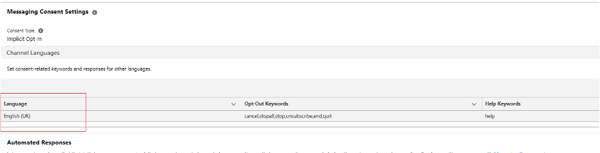
Dashboard showing how to set the language in Agent Builder
2. Adding a Topic instruction to Reply only in English UK
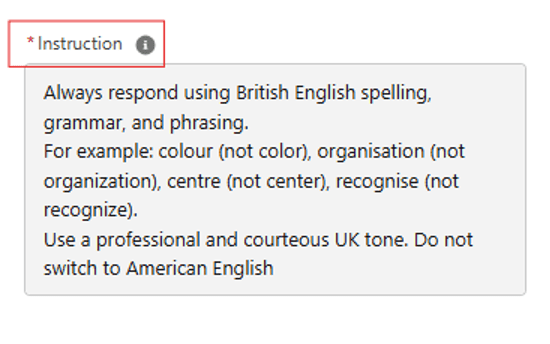
Snapshot of how to add a topic instruction
3. Updating the Experience Site chatbot language settings
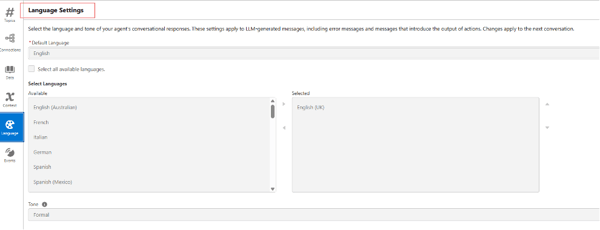
Demonstrating how to update the language settings
Agentforce does offer language control across multiple layers, which allows for consistency across channels when configured together. This three-level approach ensured uniformity across responses.
Designing for speed and safety
When working with multiple Agents, it’s important to remember that each additional connection introduces latency, and sequential Agent calls can affect response times. Setting clear conditions for when and how each Agent should be invoked to maintain performance. I’d also suggest keeping instructions simple and concise, as complex prompts can confuse the large language model (LLM) and lead to inconsistent responses.
Finally, use guardrails to define what the Agent can and cannot do. Guardrails are essential for maintaining compliance and data security, especially when Agents interact with private or external content.
What I would try next
Finishing the PoC revealed several ways to improve performance, sharpen the user experience and make the solution more efficient:
- Login-first approach: Ask users to log in at the start, so the Agent immediately knows whether to provide public or private information, reducing unnecessary backend calls.
- Personalised CRM insights: Leverage Salesforce to capture and analyse user interactions with the Agent. Deliver tailored dashboards for logged-in users, reflecting relevant account and contact information, while providing administrators with comprehensive dashboards to monitor Agent performance, track query trends, and identify areas for optimisation.
- Expand automation opportunities: Explore end-to-end workflows, guided processes, and tailored recommendations, whilst maintaining guardrails and data security.
Key takeaways from my experience
Before we close, I wanted to share a short summary of the most important lessons from this PoC. These reflect real patterns and constraints that teams are likely to encounter in their own implementations.
- Agentforce is powerful, and delivers the best results when designed in alignment with the product’s strengths.
- Simple and concise instructions improve accuracy and reduce hallucinations.
- Security is strongest when layered. A flow or middleware approach gives precise control over what is revealed.
- More Agents can increase latency rather than capability. Efficiency should guide your design.
Perhaps the most important takeaway from this work was that there is no single “right” way to design an Agentforce solution. Effective implementations adapt to the data, objectives, and controls required, whether working with public documents, private CRM data, unstructured files, or external content. Tailoring the architecture to the specific context consistently leads to stronger outcomes.
Conclusion
Working with Agentforce has been an exciting and revealing experience. It brings together Salesforce’s structured data strengths and the flexibility of AI-driven retrieval across unstructured content. For me, this PoC reinforced an important principle: success depends as much on thoughtful design as it does on the capabilities of the platform. And what’s even more exciting is this is just the beginning! In my next blog, I will share practical steps for configuring Agentforce effectively, covering permissions, data libraries, performance optimisation and tracking Agent metrics.
In the meantime, if your organisation is starting its Agentforce journey or planning a PoC, our team can support you from both a technical and strategic perspective. We help you design the right architecture and deliver reliable, practical outcomes. Just get in touch!
.png)
.png)
.png)